
Veilrunner
Veilrunner 1.1.0 · $9.99 · macOS 15.0 or later · Apple silicon · iOS & iPadOS 26 or later · App Store (Universal Purchase)
Step back into the worlds that started it all. Veilrunner is a fast, good-looking MUD client built for the Mac. MUDs are the text-based online worlds that have been running for decades. Veilrunner is written in Swift and SwiftUI and runs in the App Sandbox. It works fully with VoiceOver. It gives you TinTin++-style scripting, tabs for several characters, encrypted connections and compression, and a full built-in help system. An optional automapper, Map — Early Access, draws the world as you walk.
▶ Veilrunner promo with narration · 1:38, sound on, captions included. Demo world “Emberfall (demo)”.
Read the transcript
Title card
- 00:00Step back into the worlds that started it all.
- 00:03This is Veilrunner: a MUD client made for the Mac.
Native for Mac
- 00:07Veilrunner is truly native.
- 00:09Written in Swift and SwiftUI, and built in Xcode with Apple's own tools, it's fast and right at home on macOS.
- 00:16It fully supports VoiceOver, and can speak new text as it arrives.
Scripting
- 00:21Aliases take arguments, and triggers react to whatever the game sends.
- 00:26Highlights colour the lines that matter, and #gag hides the ones that don't.
History, split view, timers
- 00:31Type a few letters and the up arrow finds matching commands; Control-R searches your history.
- 00:37#split pins the live action below while you scroll back above.
- 00:41And #delay runs any command after a wait.
Tabs and connections
- 00:45Open a tab for every character, and bring them all online with Connect All.
- 00:50There's TLS, a GMCP vitals bar, a chat window, and chat and session logs.
Built-in help, backup
- 00:56Help is built in, with a page and examples for every command.
- 01:00And Back Up Everything saves your whole setup in one file, never your passwords.
New in 1.0.4: Export / Import Settings
- 01:06New in 1.0.4: move your setup between Macs.
- 01:10File › Export Settings… saves your characters, aliases, triggers, saved MUDs, tabs and settings to a file you can AirDrop or share.
- 01:19Import Settings… shows exactly what will change, saves a backup first, and only removes scripts if you choose Replace for a character.
End card
- 01:27Veilrunner. Available now on the Mac App Store.
- 01:30Search for Veilrunner MUD Client.
- 01:33Learn more at pwr.industries.
Veilrunner 1.1.0 is available now on the App Store for $9.99, for Mac, iPhone and iPad. It’s a Universal Purchase: buy once and it covers all three. It needs macOS 15.0 or later on Mac, and iOS 26 or iPadOS 26 or later on iPhone and iPad.
Veilrunner for iPhone and iPad is out now, included in the same $9.99 Universal Purchase. It needs iOS 26 or iPadOS 26 or later. The map is not included on iPhone and iPad.
Screenshots
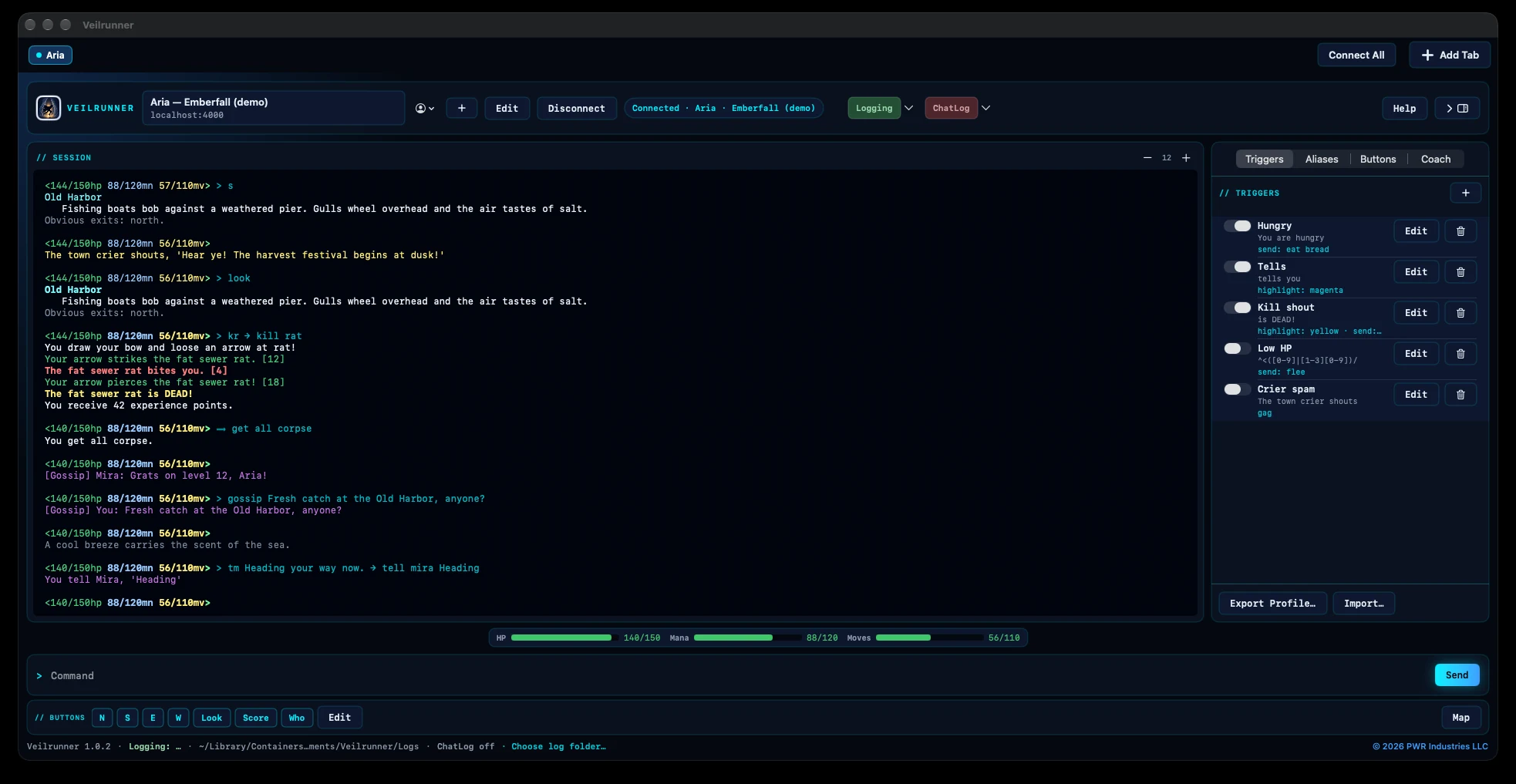
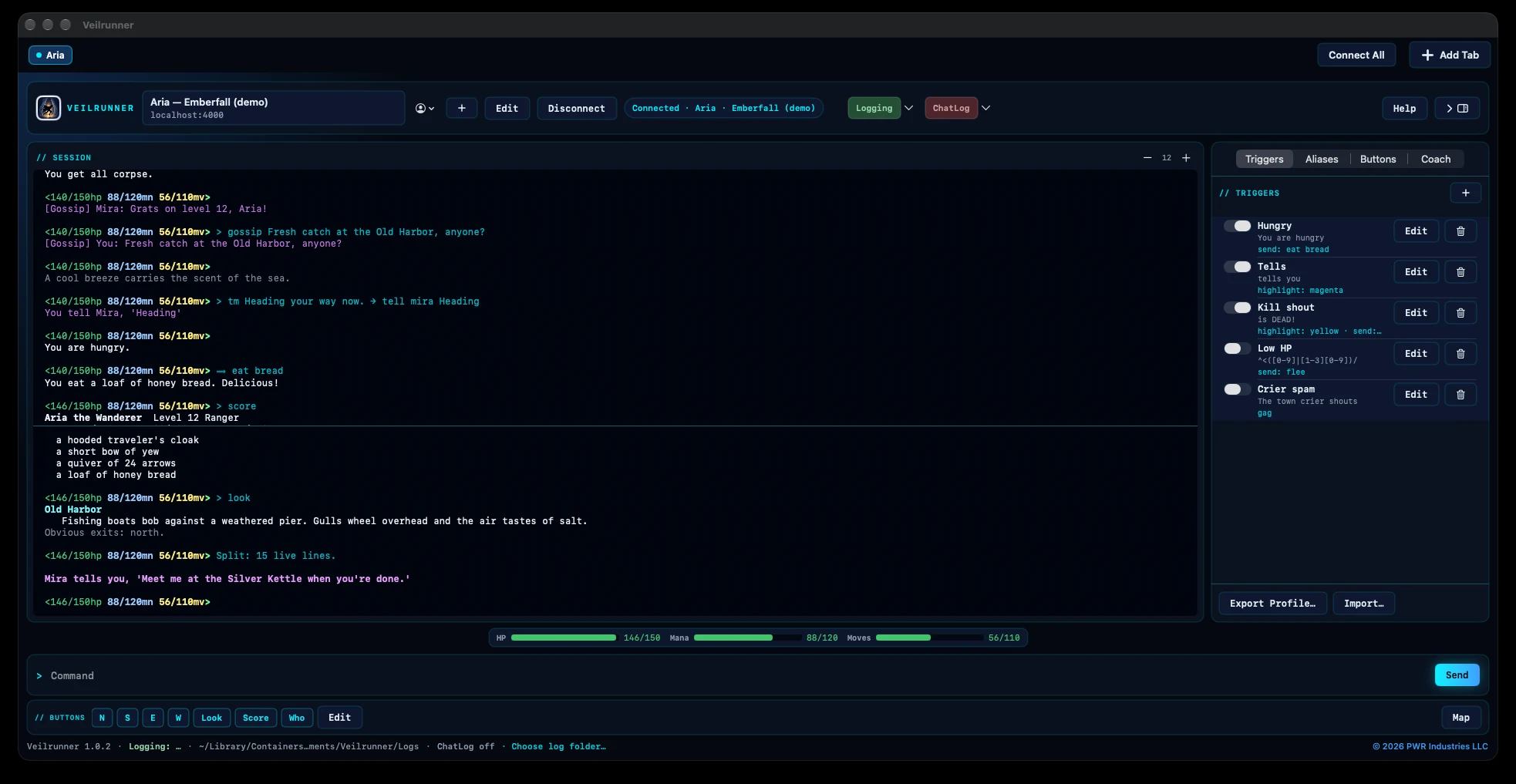
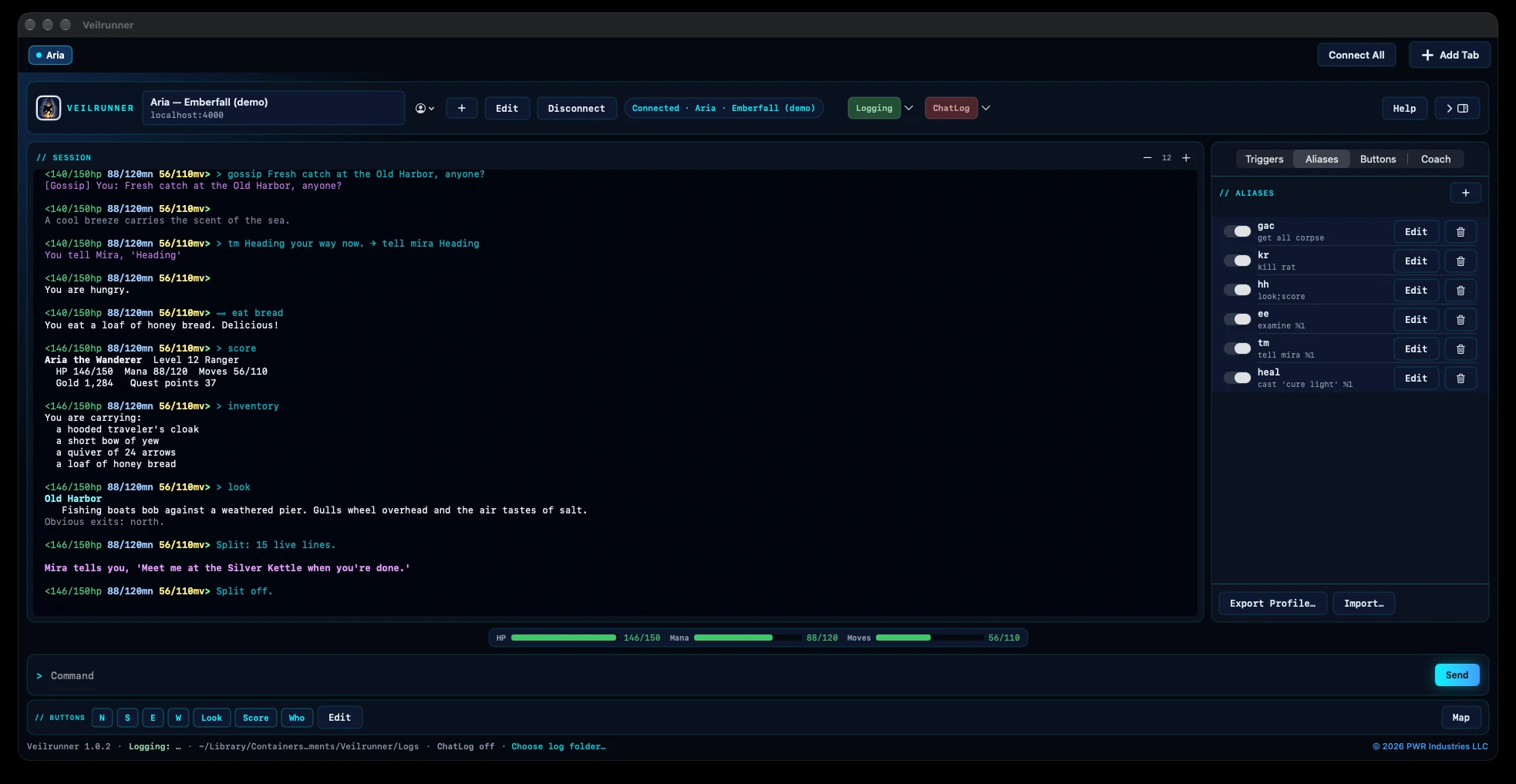
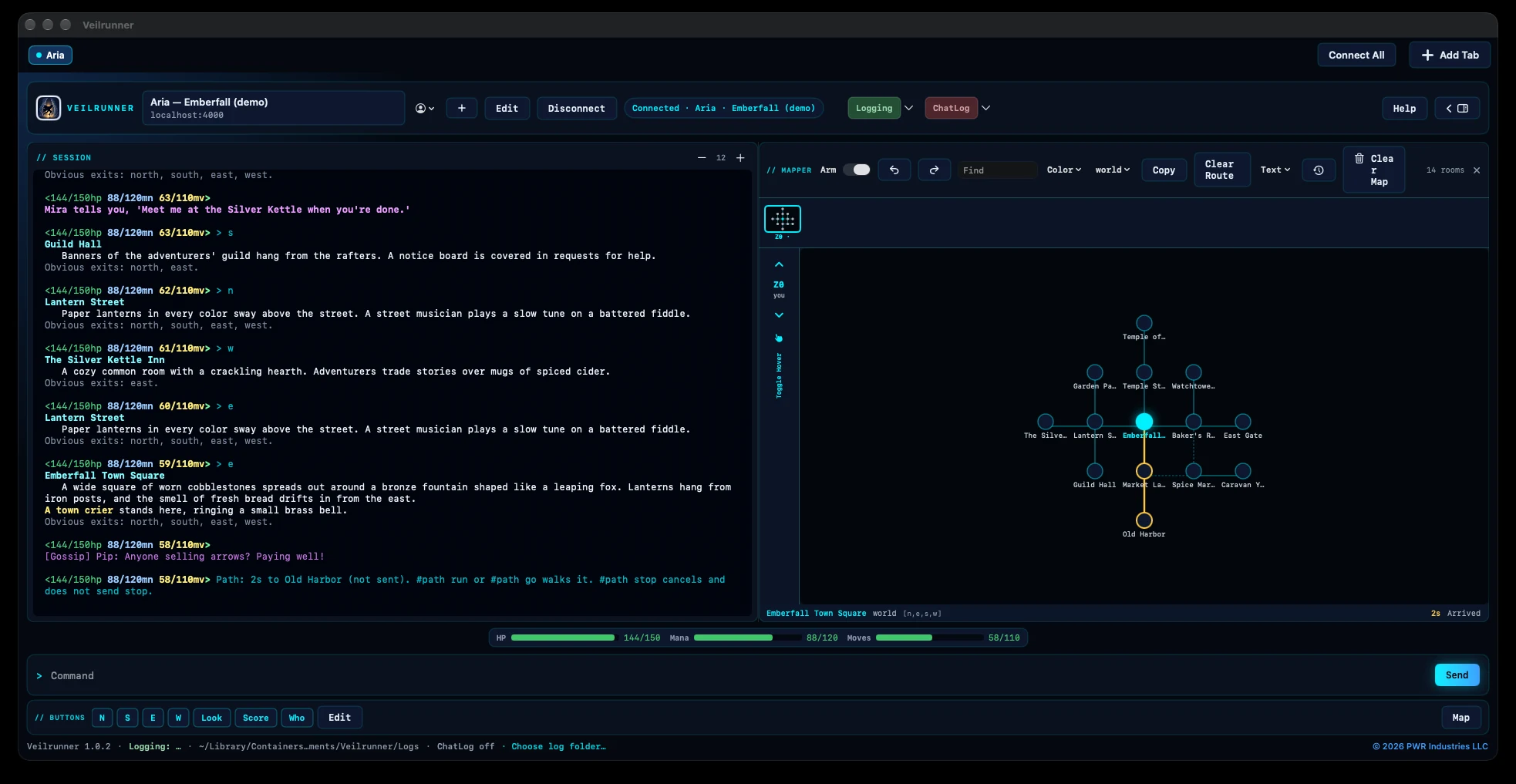
6 shotsDark mode, demo data only. Click any screenshot to view it full size.
Start playing in seconds
- Welcome screen. On first launch, a short tour covers tabs, aliases and triggers, the map and VoiceOver. It also shows whether VoiceOver is on. You can reopen it any time from Help › Welcome to Veilrunner….
- Eleven starter MUDs. File › Starter MUDs… lists well-known worlds, each with its genre, a short description and a website link: DarkeMUD, Aardwolf, Discworld, Achaea, BatMUD, Alter Aeon, Materia Magica, Realms of Despair, 3Kingdoms, Genesis and Dark and Shattered Lands. Connect opens a new tab that is ready to connect.
- Sample tab. A practice tab with labelled example aliases, triggers and buttons. It never changes your own characters. A fresh install starts clean; the examples appear only when you open the Sample Tab.
Connections
- Characters and saved MUDs. Each character has a MUD address and port, an optional password, and its own aliases, triggers, buttons, variables, lists, chat patterns, command history and map.
- Passwords stay in the macOS Keychain. They are never written to profiles, exports, backups, history or logs. When the MUD hides your typing, the command line becomes a password field.
- Auto-login. Veilrunner sends your character name. It sends the saved password only after the MUD asks for it.
- TLS per MUD. TLS 1.2 or newer, with certificate checks. Self-signed certificates are accepted only if you turn that on for that MUD. They are then pinned on first use.
- MCCP2 compression, including over TLS.
- Full telnet support. ANSI color (16, 256 and true color), terminal type with MTTS, and window size.
- GMCP.
Char.VitalsandChar.Statusdrive a live vitals bar.Room.Infodrives the map. - Predictable reconnects. A dropped link goes to Disconnected and does not retry unless you ask. You can turn on automatic reconnect in Settings: up to 3 tries.
Tabs and the session window
- Many tabs in one window. Each tab has its own connection, scrollback, character, delays and tickers. Tabs you aren't looking at turn green when new text arrives.
- Connect All connects every tab that has a character.
- Remembered tabs. Your open tabs come back when you relaunch, without connecting by themselves.
- Split view.
#splitpins the newest lines in a live pane at the bottom while you scroll back through history above. - Find and clear. Find in Output (⌘F), Clear Output (⌘K) and font size (⌘+ / ⌘−).
- Command history. History is saved per character. With text already typed, ↑ / ↓ step only through commands that start with it. ⌃R searches your history.
- Repeat any command with
#N. For example,#3 say helloor#7 e.
Scripting (TinTin++-style)
- Aliases with arguments
%1–%9and%0. - Triggers with literal or regular-expression patterns, captures and actions.
- Highlights and gags. Color matching lines, or hide them.
- Variables and lists, with simple math.
- Flow control with
#if,#elseif,#elseand#while. - Delays and tickers.
#delayruns a command once after a wait.#tickerruns it again and again on a timer. - Macro buttons below the command line.
- Inspector editors. Triggers, Aliases, Buttons and Coach, with a large multi-line editor.
- Script Coach. Describe what you want in plain English and get a suggested alias, trigger or button. It runs on your Mac; nothing goes to the cloud.
- Import TinTin++ scripts. Imported triggers that send commands are flagged before import, and you can bring them in turned off.
- Built-in safety limits. These stop runaway trigger loops and hostile text from taking over.
Chat and logs
- Chat patterns decide which lines count as chat. They feed a live chat panel with one tab per channel.
- Session logs are plain text in a folder you choose. Passwords are never written.
- A separate chat log, and
#chatlogreviewto read it inside the session window.
Built for VoiceOver
- Every tab, button, editor, map control and setting has a spoken label.
- New MUD text is spoken as it arrives. Lines that arrive together are joined and read at most once a second. Nothing is spoken during password prompts.
- Plain speech skips ANSI art and divider lines.
#speakcontrols it from the command line.
Settings
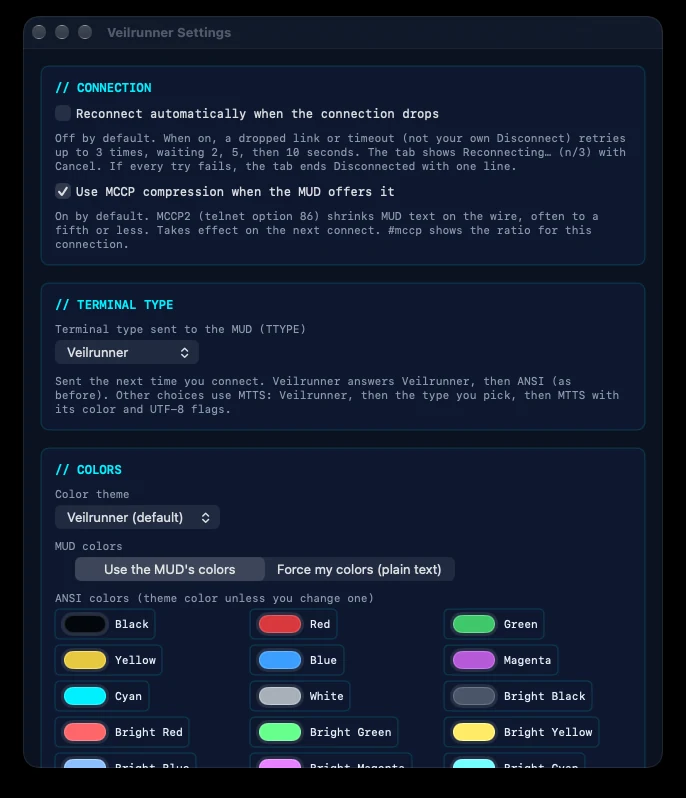
- Reconnect automatically, MCCP, and the terminal type sent to the MUD.
- Color themes: Veilrunner, Classic xterm, Solarized Dark and High Contrast. You can change any of the 16 ANSI colors.
- Wrap width, scrollback size, showing your own commands, the vitals bar, pacing for long repeats, and text encoding.
- Accessibility: speak new MUD text, and plain speech.
Back up and restore
- Back Up Everything saves characters, scripts, saved MUDs, open tabs, settings, history and maps in one file. It never includes passwords.
- Restore Everything checks the file first and saves a safety backup of your current data before it replaces anything.
- Export and Import Profile move one character's scripts between characters or Macs.
- New in 1.0.4: Export Settings and Import Settings move your whole setup to another Mac in a
.veilrunnerfile. Imports merge by default: you see exactly what will change first, a backup is saved automatically, and nothing is deleted unless you choose Replace for a character. Saved passwords are never included; they stay in your Mac’s Keychain. Treat the file as private and only import files you made or trust. Guide →
Help built in
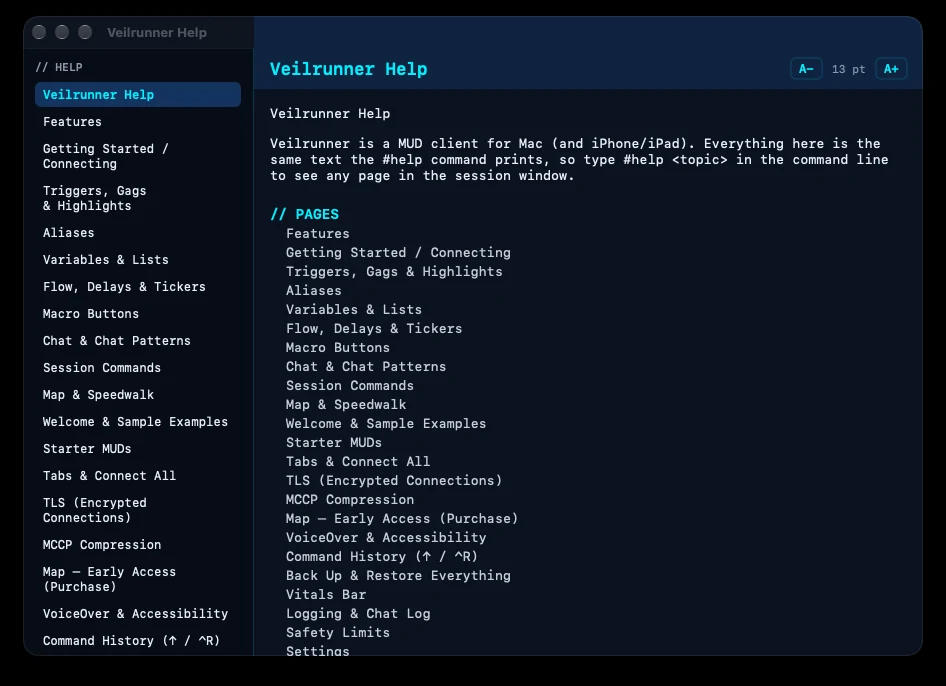
#helplists the commands, and#help <command>gives a full page with examples.- The Help menu opens a help window with guides for every feature, keyboard shortcuts and release notes.
Map — Early Access (optional in-app purchase on Mac)
- Automapping. Rooms come from GMCP room data or from the room text, and are organized into zones and floors.
- Click to walk. Speedwalk waits for each step to arrive and stops safely when a step fails. You can also stop and resume it.
- Find and route.
#map findand#pathshow a gold route preview, and#path runwalks it. - Hand editing. Move, merge, delete, link and unlink rooms. Mark one-way exits. Add notes, labels and colors.
- Undo and redo for 100 steps. Dated snapshots are saved before risky changes. Clear Map can be undone.
- Import and export as JSON or as a readable text file.
- New in 1.0.2: room names are read more reliably.
#map relabelrepairs names that were read wrongly. - Map — Early Access is a one-time purchase. It is fully usable today, new map features keep coming, and early supporters keep everything they bought. Map files are never deleted while the map is locked.
Version 1.1.0 Current
- Safer settings imports. Import Settings asks before bringing in triggers that send commands (they come in off by default), before weakening a MUD’s TLS or self-signed setting, and before changing where a MUD connects or a login name. You also see alias, variable, and button changes in the preview before anything is applied.
- Saved passwords are scrubbed from exports. Back Up Everything and Export Settings remove every saved Keychain password wherever it appears in the file. If some can’t be read, you’re warned that they may still be in the file, so check it before sharing.
- A clean start. A fresh install no longer seeds a sample alias, direction buttons, or sample character. Your existing setup isn’t changed.
- Clearer empty state and import errors. The window says “Connect to a MUD to begin,” and the wrong file type names what was expected.
Version 1.0.4
- Move your setup between Macs. File › Export Settings… saves your characters, aliases, triggers, saved MUDs, tabs and settings to a
.veilrunnerfile you can AirDrop or share. - Import Settings… merges by default: you see exactly what will change first, a backup is saved automatically, and nothing is deleted unless you choose Replace for a character. Saved passwords are never included.
- Clearer add-on purchases. You now see a progress indicator and a plain status message right next to the button, so you always know what happened.
- Plus small fixes and polish.
Version 1.0.3
- Main window. The new Window › Main Window command (⌘0) brings the main window back.
- Clicking Veilrunner in the Dock reopens the main window if you closed it.
- Closing the main window no longer quits Veilrunner. To quit, choose Veilrunner › Quit Veilrunner (⌘Q).
Version 1.0.2
- Map room names. DarkeMUD rooms are named from their title line again, not from the lighting line or a piece of the description. Wilderness titles are read too.
- A room with a misread name fixes itself the next time you visit it, without creating a duplicate.
#map relabelfixes what it can right away. It saves a snapshot first and can be undone.
Version 1.0.1
- Map — Early Access. In the Mac App Store version, the map is a one-time in-app purchase.
- Opening the map while it is locked shows a purchase sheet with Buy and Restore Purchases.
- Locked map data is hidden, never deleted.
Version 1.0.0
- The first full release: tabs and Connect All, TLS and MCCP2, the full scripting set with safety limits, prefix history and ⌃R search, session and chat logs, the automapper, full VoiceOver support, Settings and themes, one-file backup and restore, built-in help, and the Welcome screen with starter MUDs.
- Veilrunner Help Center: 23 guides covering every feature
- Getting started · Keyboard shortcuts · Troubleshooting
- System requirements: macOS 15.0 or later
- Promo video with narration (MP4) · With burned-in captions (MP4) · Captions (WebVTT) · Transcript
Veilrunner does not collect, sell or share any personal data. It has no analytics, no advertising and no tracking. Your characters, scripts and logs are files on your Mac, and your passwords stay in the macOS Keychain. Nothing is sent anywhere except the MUD you connect to. Read the Veilrunner privacy policy →
Is Veilrunner available yet?
Yes. Veilrunner is on the Mac App Store for $9.99. It needs macOS 15.0 or later.
Which Macs does it run on?
Macs running macOS 15.0 or later. See System requirements.
Is there an iPhone or iPad version?
Yes. Veilrunner is a Universal Purchase: one $9.99 purchase covers Mac, iPhone and iPad. On iPhone and iPad it needs iOS 26 or iPadOS 26 or later. The map is not included on iPhone and iPad.
How do I connect to a MUD?
Choose File › Starter MUDs… and click Connect next to a world. Or add your own with + in the connection bar, then press Connect (⌘↩). See Getting started.
What is Map — Early Access?
The automapper is an optional one-time in-app purchase in the Mac App Store version. It's fully usable today, new map features keep coming in free updates, and early supporters keep everything they bought. See Map — Early Access.
I bought the map but it's locked.
Choose Veilrunner › Restore Purchases. It's also in Settings and on the purchase sheet. Make sure you're signed in with the Apple Account you used to buy it.
Did I lose my maps while the map was locked?
No. Locked maps are hidden, never deleted. They come back as soon as the map is unlocked.
Does Veilrunner collect any data?
No. Your characters, scripts and logs are files on your Mac. Nothing is sent anywhere except the MUD you connect to. Script Coach runs on your Mac.
Can I import my TinTin++ scripts?
Yes. Use File › Import TinTin Script… or #import. If an imported TinTin++ script has triggers that send commands, Veilrunner asks first: it shows how many there are and the first five, and you can Import, Import Disabled (they come in turned off so you can review and turn them on), or Cancel.
Does it support TLS, MCCP and GMCP?
Yes:
- TLS 1.2 or newer, set per MUD
- MCCP2 compression, including over TLS
- GMCP vitals (
Char.Vitals/Char.Status) and room data (Room.Info)